
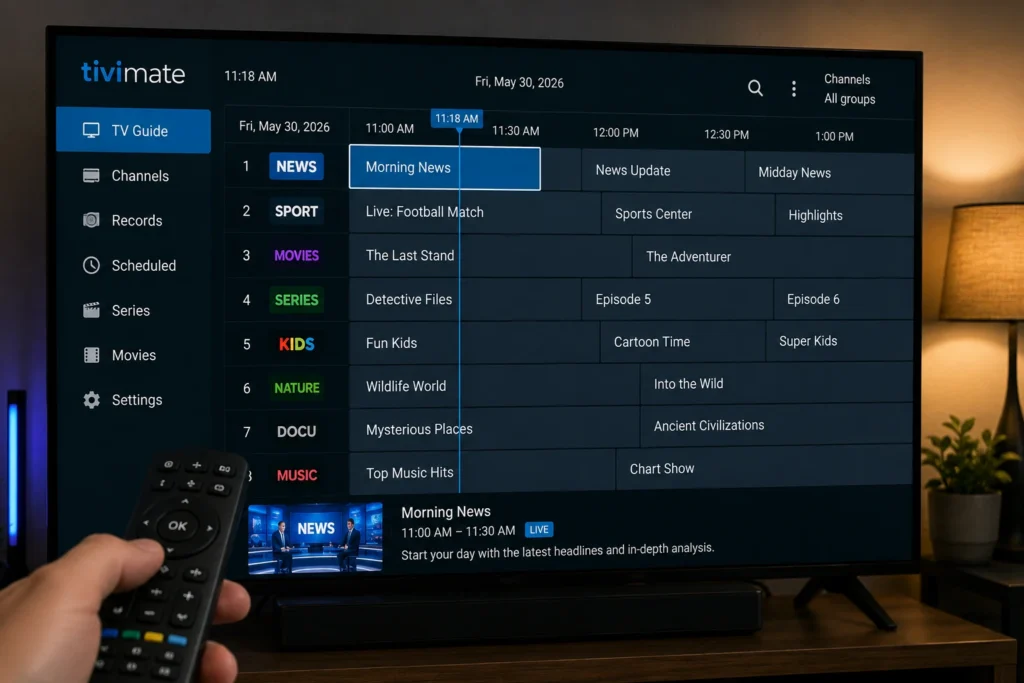
If you’re deciding whether to install the latest TiviMate update, here’s the practical answer: recent versions have focused on stability, EPG handling, and bug fixes rather than major new features, and it’s generally worth waiting a week or two after a major release before updating, since early bug reports are common. This review covers what’s genuinely changed, what to check before and after updating, and how to avoid a scam that specifically targets TiviMate users.
TiviMate remains one of the most popular IPTV player apps for Android TV, known for its clean, remote-friendly interface and strong EPG (Electronic Program Guide) support. Like other IPTV player apps, TiviMate doesn’t provide channels or content itself — it displays and organizes content from a playlist source (M3U or Xtream Codes) that you supply, typically from your own licensed IPTV subscription.
Table of Contents
What Is TiviMate?
TiviMate is a media player app built specifically for Android TV and Android TV box devices, with a design optimized for remote-control navigation rather than touchscreen use. It’s available as a free download, with an optional Premium upgrade that unlocks additional functionality.
Unlike some competing apps, TiviMate is not officially distributed for Fire TV/Fire OS devices or iOS, since it’s built around the standard Android TV platform. Some users sideload it onto Firestick devices, though this isn’t the officially supported installation path.
TiviMate Update Review: What’s Actually New
If you’ve searched for a detailed, official changelog for the latest TiviMate update, you’ve likely noticed the same thing many users report: the developer typically does not publish a fully detailed, line-by-line changelog. App store listings usually show a brief summary, and more specific details tend to circulate through user communities rather than official documentation.
Based on consistent patterns across recent release cycles, updates in this app’s development history have generally focused on:
- Performance and stability improvements, including fixes for crashes affecting specific device models
- EPG loading speed and accuracy, reducing blank or missing guide entries
- Expanded codec and format compatibility for smoother playback
- Minor interface refinements and settings additions, such as customizable playback and display options
Because detailed release notes aren’t consistently published, it’s worth checking the app’s own in-app changelog or its official Google Play listing directly before relying on third-party summaries, since accuracy varies significantly across sites covering this app.
Why Are TiviMate’s Update Notes So Hard to Pin Down?
Part of the reason this TiviMate update review leans on general patterns rather than a bullet-point changelog is structural. TiviMate has historically operated with a small, community-engaged development team rather than a large corporate release process, and it distributes update notes primarily through in-app prompts and its own Google Play listing rather than a dedicated public changelog page or press releases.
This isn’t necessarily a red flag — many independent developer tools operate this way — but it does mean that most of what circulates online as “TiviMate 5.x new features” traces back to user testing and community forum reports rather than official documentation. When something matters to your setup specifically, checking the in-app changelog after installing an update is more reliable than any third-party summary, including this one.

Free vs. Premium: What Each Tier Includes
A lot of confusion around “new TiviMate features” actually comes from people discovering Premium-only functionality that has existed for some time, rather than genuinely new additions. Here’s the consistent breakdown:
| Feature | Free Version | Premium |
|---|---|---|
| Live TV playback with EPG | Yes | Yes |
| Number of playlists | 1 | Multiple |
| Catch-up / time-shifted viewing | No | Yes |
| Scheduled and live recording (DVR) | No | Yes |
| Multi-view (watching multiple channels at once) | No | Yes |
| Favorites and channel groups | Limited | Full support |
| Program reminders | No | Yes |
Premium is purchased through the separate TiviMate Companion app, available on the Google Play Store, as either an annual subscription or a one-time lifetime purchase covering up to five devices. It cannot be purchased from within the main TiviMate app itself.
Important: Beware of Fake “Lifetime Key” Unlock Guides
This is worth flagging clearly: a significant amount of content online offers “free TiviMate Premium lifetime keys,” cracked APKs, or third-party “unlock guides” bundled with unauthorized IPTV subscription sales. These are not legitimate ways to access Premium features. Genuine TiviMate Premium access is only issued through the official Companion app and tied to a real purchase.
Beyond the legal issues involved in circumventing paid software licensing, these unofficial “unlock” tools are a common vector for malware and account compromise, since they typically require installing unverified APK files from outside official app stores. If a deal for TiviMate Premium seems unusually cheap or bundled with a “free” IPTV channel package, treat it as a red flag rather than a bargain.
Known Issues After Recent Updates
It’s common, though not universal, for a portion of users to report bugs shortly after a major TiviMate release — issues like playlist loading problems, EPG display glitches, or crashes on specific device models. This pattern isn’t unique to TiviMate; it’s typical of actively developed apps that need to support a wide range of Android TV hardware, from budget boxes to flagship players, each with different chipsets and firmware quirks.
If you rely on TiviMate daily and want to minimize disruption:
- Consider waiting one to two weeks after a major update before installing it, giving the developer time to ship follow-up patches
- Keep a note of your current working version number before updating, in case you need to reference it
- Check user communities for recent reports specific to your device model before updating
Is Upgrading to Premium Worth It After This Update?
If you’re on the free version and weighing whether Premium is worth adding alongside your latest TiviMate update, the honest answer depends on how you watch. Casual viewers who mainly flip between a handful of favorite channels often find the free tier’s single playlist and basic EPG perfectly sufficient. Households that record shows, juggle multiple provider playlists, or want to keep an eye on more than one live channel at once tend to get clear, tangible value from Premium’s recording, multi-view, and multi-playlist support.
Since Premium is a one-time lifetime purchase or an annual subscription rather than a recurring monthly fee in most cases, it’s worth trying the free version thoroughly first to confirm TiviMate fits your setup before paying for the upgrade.
Step-by-Step: How to Update TiviMate Safely
- Check your current version under TiviMate’s settings menu before updating.
- Update through the Google Play Store or your device’s official app store rather than a third-party APK download. If you sideload TiviMate on a device like Firestick, review Android’s official guidance on installing apps from unknown sources first, since this method carries more risk than store-based installs.
- Back up your playlist and EPG source URLs somewhere safe in case they need to be re-entered.
- Update on one device first if you run TiviMate across multiple TVs, and confirm playback and EPG work correctly before updating the rest.
- Verify your Premium status after updating by checking Settings → Premium Account, since account-linked features occasionally require re-verification after major updates.
- Report persistent bugs through the app’s official feedback channel rather than relying solely on third-party workaround guides.
Common Problems and How to Fix Them
The table below covers the issues most frequently reported after a TiviMate update, along with practical fixes for each.
| Problem | Likely Cause | Fix |
|---|---|---|
| Playlist won’t load after update | Local cache conflict or corrupted playlist entry | Remove and re-add the playlist source |
| EPG shows “No Information” | Provider’s EPG data issue, not a TiviMate issue | Check with your provider; confirm the EPG URL is entered correctly |
| Premium features missing after update | Account not re-verified post-update | Go to Settings → Premium Account and sign in again |
| App crashes on specific device | Compatibility issue with that hardware model | Check for a follow-up patch, or temporarily roll back to your previous known-working version |
| Recording feature not working | USB drive not formatted correctly | Recording typically requires a FAT32-formatted USB drive; reformat if needed |
Tips for a Smoother TiviMate Experience
- Set your EPG update interval to refresh at least once every 24 hours to keep guide data current.
- Use the Bouquet or channel-group filtering options to hide content you don’t watch, keeping your guide manageable.
- If you manage multiple devices, use the Companion app to review and manage device activations rather than reinstalling from scratch.
- Pair TiviMate with a transparent, properly licensed IPTV provider — the app’s performance depends heavily on the quality of the playlist source, not just the player. See our guide on [INTERNAL LINK: How to Choose a Legal IPTV Service] for what to look for.
- If you ever request a refund for a Premium purchase, do so promptly, since Google’s own purchase-refund window is time-limited; see Google Play’s official refund policy for current eligibility windows.
Frequently Asked Questions
1. What does the latest TiviMate update actually change?
Recent updates have generally focused on stability, EPG performance, and compatibility fixes rather than major new features, though the developer doesn’t consistently publish a detailed public changelog.
2. Is it safe to update TiviMate right away?
It’s usually fine, but waiting one to two weeks after a major release lets early bugs get patched, which is a reasonable precaution if you rely on the app daily.
3. Does TiviMate provide TV channels?
No. TiviMate is a media player that displays content from a playlist source you provide, typically from a separate, licensed IPTV subscription.
4. What’s the difference between TiviMate and TiviMate Premium?
The free version supports one playlist and basic live TV with EPG. Premium adds multiple playlists, catch-up viewing, scheduled recording, multi-view, and program reminders.
5. Can I get TiviMate Premium for free legitimately?
No. Genuine Premium access requires a real purchase through the official Companion app. Free “lifetime key” offers found elsewhere are not legitimate and often carry security risks.
6. Why did my EPG stop working after updating?
This is almost always a provider-side data issue rather than a TiviMate bug. Confirm your EPG source URL is correct and contact your provider if guide data still doesn’t load.
7. Is TiviMate available on Firestick or iOS?
TiviMate is officially built for Android TV devices. It’s not officially available on Fire OS (Firestick) or iOS, though some users sideload it onto Firestick outside official channels.
8. How many devices can I use with TiviMate Premium?
A Premium purchase, whether annual or lifetime, typically covers up to five devices linked to the same account.
Final Thoughts
This TiviMate update review comes down to a simple takeaway: recent releases prioritize stability and EPG reliability over flashy new features, official changelogs are thin, and the biggest risk most users face isn’t the update itself — it’s fake “Premium unlock” offers circulating outside official channels. Stick to official update sources, verify your Premium account status after major releases, and treat unusually cheap “lifetime key” deals with suspicion.
None of this means you should be hesitant about TiviMate as a player. Its combination of a fast, remote-friendly interface and genuinely strong EPG handling is why it has remained a go-to choice for Android TV users for years, updates and occasional bugs included. Approaching each TiviMate update with a little patience and a habit of checking official sources first will get you the benefits of ongoing development without the frustration that comes from rushing every release or falling for an unofficial shortcut.