

If you’re looking into the latest IPTV Smarters update, here’s the short answer: recent versions continue to refine the app’s interface, playback stability, and playlist management, while device compatibility and account security remain an ongoing focus. This guide walks through what’s actually changed, what to verify before you update, and how to get the most out of the app safely.
IPTV Smarters Pro is one of the most widely used third-party IPTV player applications, and it’s important to understand what that means. The app itself is a media player — it does not provide TV channels, movies, or any content on its own. Instead, it lets you organize and play content from playlist sources (such as M3U/M3U8 links) that you supply, typically from a licensed IPTV subscription service. Understanding this distinction matters both for using the app correctly and for staying on the right side of copyright law.
Table of Contents
Why “Official” Release Notes Are Hard to Find
If you’ve searched for a detailed, version-by-version changelog for IPTV Smarters Pro and come up empty, you’re not alone. Unlike major streaming platforms that publish structured release notes through official corporate channels, many IPTV player apps — including IPTV Smarters Pro — are distributed with minimal, inconsistent public documentation. App store listings are typically updated with a short “what’s new” summary rather than a detailed technical changelog.
This is worth knowing because a large amount of content published about “IPTV Smarters updates” online comes from IPTV subscription resellers using the app’s name to promote their own services, rather than from the app’s actual developers. When researching any IPTV Smarters update, it’s worth treating specific feature claims with some skepticism unless they’re confirmed directly in the app’s own store listing or in-app changelog.
What Is IPTV Smarters?
IPTV Smarters Pro functions similarly to other IPTV player apps like TiviMate or Perfect Player: it provides the interface, playback engine, and organizational tools, while the actual content comes from whichever provider’s playlist or account you connect. This is a standard model across the IPTV player app category and isn’t unique to Smarters.
Because the app is a playback tool rather than a content source, its “features” are primarily about how well it organizes, displays, and plays back whatever content you connect it to — not about the channels or shows themselves.
Important: Verify You Have the Legitimate App
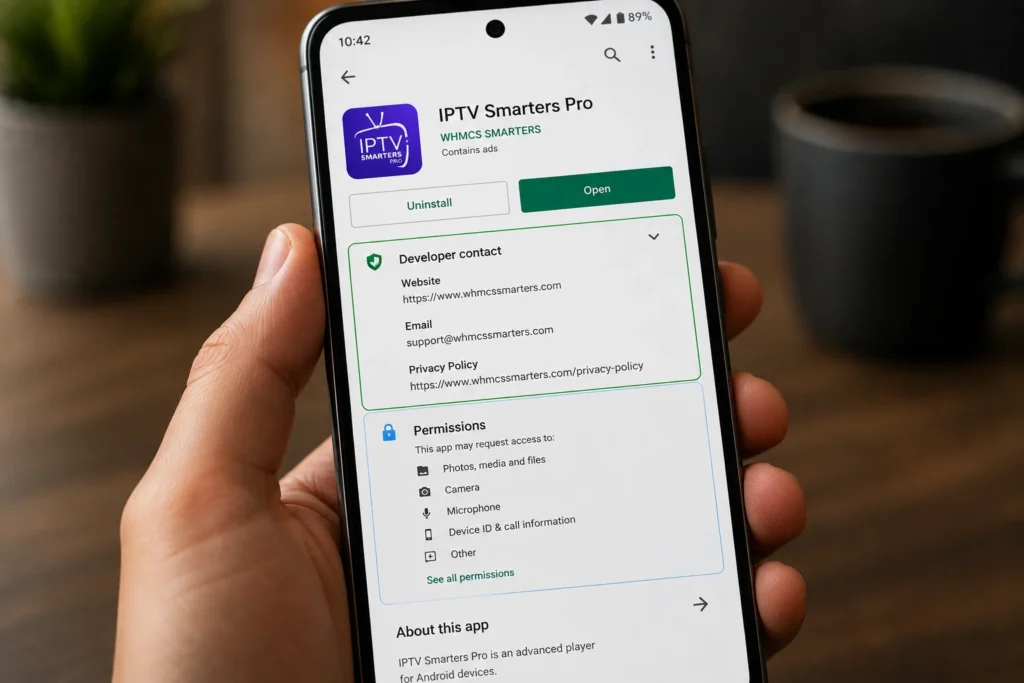
Before covering feature changes, it’s worth flagging something that matters more than any single update: IPTV Smarters Pro’s name and branding have been widely copied by unofficial and low-quality clone apps, some of which carry poor safety practices such as unencrypted data handling or vague developer information. This is a known issue across app stores for popular IPTV player names.
Before installing any update, or the app itself:
- Check the developer name listed on the store page and compare it against previous versions you’ve used
- Review the app’s permissions and data-safety disclosures before granting access
- Be cautious of apps with very few reviews, low ratings, or generic developer contact details
- Keep Google Play Protect enabled, which scans apps for known harmful behavior; see Google’s official guidance on Play Protect for how this works
This step matters more than any individual feature change, since installing a compromised clone app can expose your device to far greater risk than an outdated interface.
What’s Included in Recent IPTV Smarters Versions
Rather than repeating unverified “new feature” claims circulating on IPTV reseller and affiliate sites, this section covers the core functionality consistently present across recent, legitimate versions of the app, based on official app store listings and developer descriptions.
Interface and Navigation
Recent versions continue to emphasize a clean, category-based browsing layout, with dedicated sections for live TV, video-on-demand, and series content. Full remote-control support remains a core focus, particularly for Android TV and set-top box installations where couch-friendly navigation matters more than touchscreen design.
Playlist and Multi-Source Management
The app supports configuring and switching between multiple playlist sources, which is useful if you maintain more than one legitimate subscription or want to organize content by category. This playlist management layer is one of the app’s most consistently cited strengths across versions.
EPG (Electronic Program Guide) Support
Like most modern IPTV player apps, IPTV Smarters Pro supports Electronic Program Guide data, showing scheduled programming for live channels where your provider supplies EPG information. The quality of this feature depends heavily on whether your provider supplies accurate, well-formatted EPG data — the app itself only displays what it receives.
External Player Integration
For advanced codec or subtitle support beyond the app’s built-in player, IPTV Smarters Pro allows playback through external players such as VLC media player, which supports a wider range of formats and can sometimes resolve playback issues the built-in player struggles with.
Multi-Device and Android TV Compatibility
The app remains available across Android phones, tablets, Android TV boxes, and Fire TV-compatible devices, with layouts that adjust depending on screen size and remote versus touch input.
Parental Controls
Many versions of the app include PIN-based parental controls that let you restrict access to specific categories or the entire library. This is particularly useful on shared household devices where children may have independent access to the streaming setup.
Catch-Up and Time-Shifted Viewing
Where a provider supports it, the app can display catch-up content, allowing you to watch recently aired programming after its original broadcast time. As with EPG data, this feature depends entirely on whether your provider’s playlist includes catch-up support — the app simply displays what’s made available to it.
How Update Frequency Compares to Other Player Apps
IPTV Smarters Pro’s update cadence is broadly similar to other third-party IPTV player apps: periodic releases focused on bug fixes, interface refinements, and compatibility with newer Android and Android TV versions, rather than frequent large feature overhauls. This is typical for mature, established apps in this category, where the core functionality has been stable for years and updates mostly address edge cases, performance, and device compatibility.
If you’re comparing update transparency across apps, it’s worth checking each app’s official store listing directly rather than relying on third-party summaries, since accuracy varies significantly across the sites that cover this space.
Step-by-Step: How to Update IPTV Smarters Safely
- Confirm your current app’s developer and version in your device’s app settings before updating.
- Update through your original installation source — the same app store or official distribution channel you originally used, rather than a new download from an unfamiliar link.
- Back up your playlist configurations if the app supports export/import, in case an update requires reconfiguration.
- Review permission prompts carefully after updating, since legitimate updates shouldn’t suddenly request unrelated permissions.
- Test playback on one device first before updating across multiple devices in your household.
- Check for follow-up patches shortly after a major update, since early bug fixes are common in the days following a new release.
Common Problems and How to Fix Them
| Problem | Likely Cause | Fix |
|---|---|---|
| App crashes after updating | Cache conflict with the previous version | Clear the app’s cache in device settings, or reinstall if the issue persists |
| Playlists disappeared after update | Local data reset during update | Re-add playlist sources using your provider’s connection details |
| EPG not loading | Provider-side EPG issue, not an app issue | Contact your IPTV provider, since EPG data comes from them, not the app |
| Playback stutters or buffers | Network or device performance issue | Test with an external player like VLC, or switch to a wired connection |
| Remote navigation feels unresponsive | Older device hardware struggling with new interface | Restart the device and confirm you’re running the latest firmware |
Tips for a Better Experience After Updating
- Keep only the playlist sources you actively use to avoid a cluttered interface.
- Restart your device after major app updates rather than just the app itself.
- If a new update introduces bugs, check whether an immediate follow-up patch has been released before reinstalling an older version.
- Use category folders or favorites features, where available, to keep large channel lists manageable.
- If you sideload the app from outside an official app store, review Android’s official guidance on unknown app sources first, since sideloading carries more risk than store-based installs.
- Pair the app with a transparent, licensed IPTV provider, since playback quality and EPG accuracy depend heavily on the source, not just the player. For more on evaluating providers, see our guide on [INTERNAL LINK: How to Choose a Legal IPTV Service].
Frequently Asked Questions
1. What does the latest IPTV Smarters update actually change?
Recent updates have focused on interface refinements, playlist management, and stability improvements rather than adding entirely new content features, since the app’s role is playback and organization, not content delivery.
2. Does IPTV Smarters Pro provide TV channels?
No. The app is a media player that displays content from playlist sources you connect, typically from a separate IPTV subscription provider.
3. Is IPTV Smarters Pro safe to use?
The legitimate app is a standard media player tool, but the name has been widely cloned by unofficial apps with weaker safety practices. Always verify the developer and permissions before installing or updating.
4. Why did my channels disappear after updating?
This is usually caused by local data resets during major updates. Re-adding your playlist source typically resolves it.
5. Can I use IPTV Smarters Pro with any IPTV provider?
Generally, yes, since the app accepts standard M3U/M3U8 playlist formats used by many providers. Compatibility can vary depending on how a specific provider formats its playlist and EPG data.
6. Why does the EPG not show program information?
EPG data comes from your provider, not the app itself. If channels play but no schedule appears, the issue is almost always on the provider’s side.
7. Should I always install the latest update immediately?
Testing on one device first is a reasonable precaution, especially for major version updates, since early bugs are common in the days following release.
8. What should I do if I suspect I installed a fake version of the app?
Uninstall it immediately, run a security scan with Google Play Protect, and reinstall only from your original, trusted source.
9. Why can’t I find official release notes for the latest IPTV Smarters update?
Many IPTV player apps, including IPTV Smarters Pro, publish only brief “what’s new” summaries rather than detailed technical changelogs. Treat detailed feature claims from third-party sites with caution unless confirmed in the app’s own listing.
10. Does updating the app change which channels I can access?
No. The app itself doesn’t control channel access — that depends entirely on your playlist source or subscription provider, not on the app version you’re running.
Final Thoughts
The most important takeaway about any IPTV Smarters update isn’t a single new feature — it’s making sure you’re running the legitimate app from a trustworthy source before anything else. Once that’s confirmed, recent versions of this IPTV Smarters update cycle continue to focus on interface polish, playlist organization, and stability rather than dramatic overhauls, which is typical for a mature player app in this category.
If you’re evaluating whether to update right away or wait, the safest approach is usually to update on one device first, confirm playback and playlist stability, and then roll the same IPTV Smarters update out to any additional devices in your household. This small amount of caution costs little time and avoids disrupting viewing across multiple screens at once if an update happens to introduce a bug.