
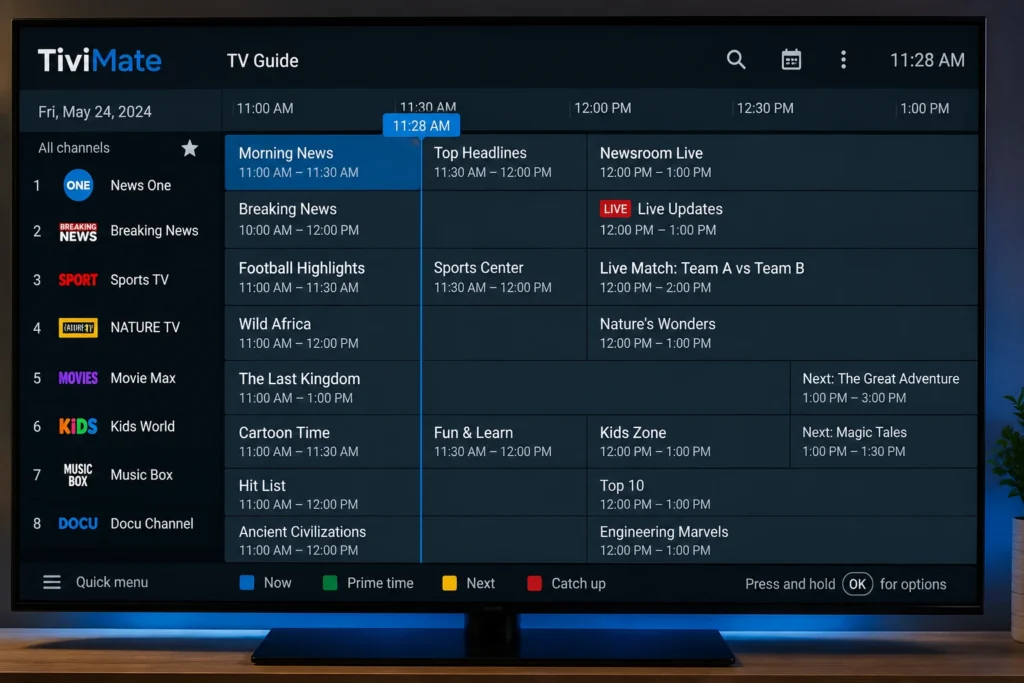
New to the app and want to get it set up the right way? This TiviMate complete guide walks through installation, navigation, and the settings that matter most, so you can get comfortable with the interface quickly instead of guessing your way through menus. It covers setup, the EPG, favorites, parental controls, and troubleshooting common playback issues.
TiviMate is a media player app popular on Android TV and Amazon Fire TV devices. Like other IPTV players, it doesn’t provide content itself — it displays content from whatever properly licensed IPTV service you’re subscribed to. This guide focuses entirely on the app’s interface and settings.
Table of Contents
What Is TiviMate?
TiviMate is a media player application designed primarily for Android TV, Google TV, and Amazon Fire TV devices, known for its clean, TV-friendly interface and customizable Electronic Program Guide (EPG). A free version is available with core functionality, alongside an optional premium tier that unlocks additional customization features.
Because TiviMate is a player rather than a content source, everything you watch depends on your active, legitimate subscription — the app organizes and displays it.
Getting Started: Installation and Setup
1. Download From an Official App Store
Install TiviMate only from your device’s official app store — the Google Play Store for Android TV and Google TV devices, or the Amazon Appstore for Fire TV. Avoid sideloaded or modified versions, which can carry security risks.
2. Confirm Your Device Meets Basic Requirements
TiviMate is built for Android-based TV platforms, so confirm your device runs a supported version of Android TV, Google TV, or Fire OS before installing.
3. Enter Your Subscription Details
When you first launch the app, you’ll be prompted to add a playlist source using the account information provided directly by your licensed IPTV provider. Follow the specific instructions your provider gives you at sign-up, since setup steps vary by service.
4. Let the Channel List and EPG Sync
After adding your subscription details, TiviMate will sync your channel list and program guide. This can take a few moments depending on your library size and connection speed.
Navigating the Interface
TiviMate’s layout is built around a few core areas:
- Channel List — the main grid of live channels, often with a live preview
- EPG — a detailed, scrollable program guide showing current and upcoming shows
- Favorites/Categories — customizable groupings for faster navigation
- Settings — playback, parental control, and interface preferences
Understanding this layout is the fastest way to feel comfortable in TiviMate, since most beginner confusion comes from not knowing where a specific setting lives.
Key Features to Set Up Early
Favorites and Custom Categories
TiviMate lets you create custom channel groups and reorder them to match how you actually watch, which is especially useful if your provider’s default channel order is long or disorganized.
Parental Controls
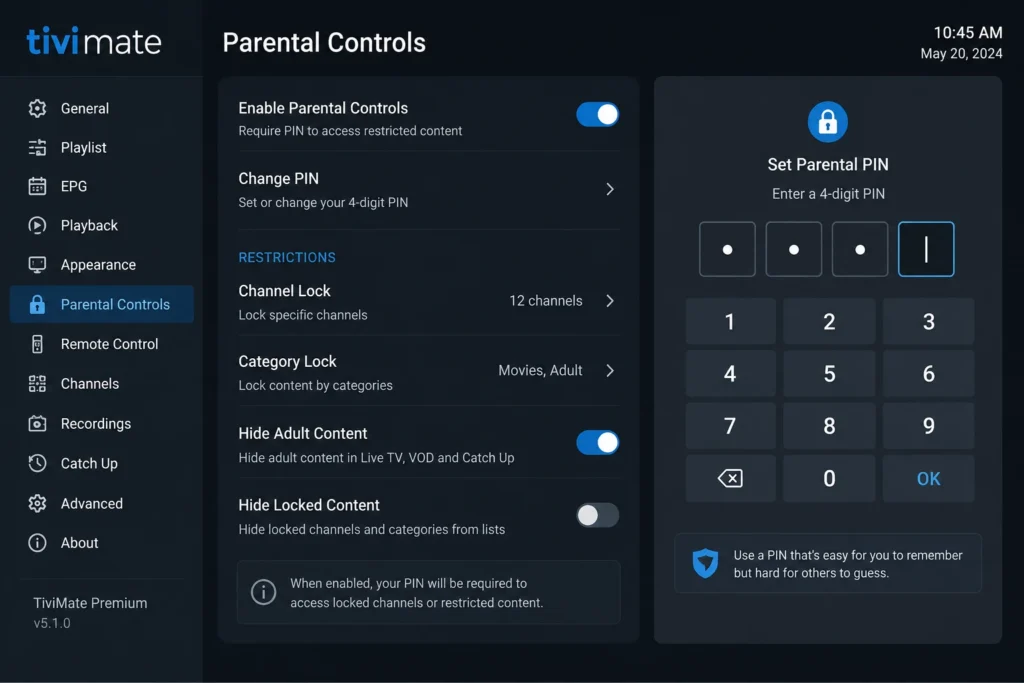
A PIN-based parental control feature restricts access to specific channels or categories. It’s worth setting up immediately in households with children.
- Open Settings
- Select Parental Control
- Create a PIN
- Choose which channels or categories to lock
EPG Customization
TiviMate’s EPG supports display customization, including grid size and time range, which can be adjusted in the guide settings to fit how you like to browse.
Multi-Screen (Premium Feature)
TiviMate’s premium tier includes a multi-screen mode for viewing several channels at once, popular during major sports events.
Playback and Display Settings
| Setting | What It Does | Recommended Starting Point |
|---|---|---|
| Buffer Size | Controls how much content pre-loads before playback | Default, unless buffering persists |
| Video Player | Switches between the built-in playback engines | Default, unless playback errors occur |
| Aspect Ratio | Adjusts how video fits your screen | Match your TV’s native resolution |
| EPG Time Format | Aligns program guide times to your timezone | Set to match your location |
If you experience frequent interruptions after setup, most causes trace back to your network rather than the app itself. Running a check with Speedtest by Ookla is a good first step.
Troubleshooting Common Issues
- Channels won’t load: Confirm your subscription is active and your internet connection is stable.
- App keeps freezing: Try increasing the buffer size in playback settings, or restart the app and your device.
- EPG shows no data: Some providers supply limited or delayed EPG data — this is provider-side, not an app issue.
- Video is pixelated or low resolution: Check your internet speed against the resolution you’re trying to watch; Netflix’s speed guidance offers a useful general benchmark.
- App won’t open after an update: Clear the app’s cache in your device settings, or reinstall from the official app store.
Best Practices for a Smooth Experience
- Keep the app updated through your official app store
- Use a wired Ethernet connection where possible for the most stable playback
- Set up parental controls before handing the device to children
- If channel loading feels slow, switching to Google Public DNS is a quick, free change worth testing
- Only use the app with a properly licensed, legitimate subscription
Frequently Asked Questions
Is TiviMate free?
A free version with core functionality is available. A premium tier unlocks additional customization features like multi-screen mode.
Does TiviMate work on Amazon Fire Stick?
Yes, it’s built for Android-based TV platforms and is compatible with Amazon Fire TV and Fire Stick devices, alongside Android TV and Google TV.
Why does my TiviMate app keep buffering?
Buffering is almost always related to your internet connection or network setup rather than the app itself.
Can I use TiviMate on multiple devices?
This depends entirely on your provider’s subscription terms and simultaneous stream limits, not on the app.
How do I set up parental controls in TiviMate?
Go to Settings, select Parental Control, create a PIN, and choose which channels or categories to restrict.
Does TiviMate support catch-up TV?
Some channels support catch-up playback, but availability depends entirely on whether your provider supplies that data.
Why is my EPG not showing program information?
Missing or delayed EPG data is typically supplied by your provider, not generated by the app itself.
Is TiviMate safe to use?
The app itself, downloaded from an official app store, is a standard media player. Safety and legality depend primarily on using a properly licensed IPTV subscription.
Final Thoughts
This TiviMate complete guide covers the essentials: getting the app installed correctly, understanding the interface, setting up parental controls and favorites, and troubleshooting the most common playback issues. Once you’re familiar with where everything lives, day-to-day use becomes second nature, and most remaining issues typically trace back to your network rather than the app itself.